
CSS Background Image Repeat
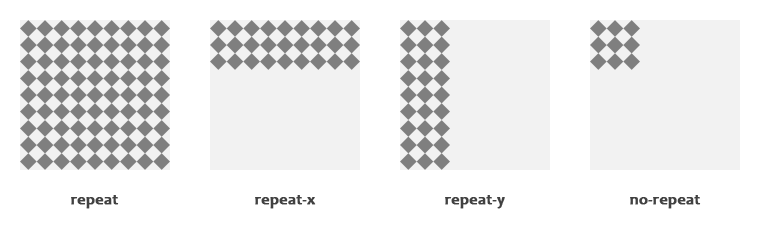
CSS background images are widely used in web design to add texture, patterns, visual depth, and branding to websites. One of the most important properties that controls how a background image behaves is background-repeat. This property determines whether and how an image repeats (tiles) within its container.
Understanding how CSS background image repeat works helps developers create visually appealing layouts without unnecessary image files or complex design hacks.
What Is CSS background-repeat?
The background-repeat property in CSS defines how a background image is repeated across an element.
When you set a background image using:
background-image: url("image.jpg");
By default, the image will repeat both horizontally and vertically to fill the entire element.
The default value is:
background-repeat: repeat;
This means the image tiles across the element in both directions.
Syntax of background-repeat
The basic syntax is:
selector {
  background-repeat: value;
}
Or using shorthand:
selector {
  background: url("image.jpg") repeat;
}
Common Values of background-repeat
1. repeat (Default)
The image repeats both horizontally and vertically.
background-repeat: repeat;
Use this when:
- You are using small pattern images
- You want a seamless background texture
- You want full element coverage using tiling
2. no-repeat
The image appears only once.
background-repeat: no-repeat;
Use this when:
- You want a logo
- You want a hero background
- You are using background-position to place the image precisely
Example:
background-image: url("logo.png");
background-repeat: no-repeat;
background-position: center;
3. repeat-x
The image repeats only horizontally.
background-repeat: repeat-x;
Use this when:
- Creating horizontal stripes
- Designing horizontal navigation backgrounds
- Adding top or bottom decorative lines
4. repeat-y
The image repeats only vertically.
background-repeat: repeat-y;
Use this when:
- Creating vertical sidebar textures
- Designing vertical separators
- Adding decorative side borders
Advanced Values in Modern CSS
Modern CSS introduced additional repeat options.
5. space
The image repeats as many times as possible without clipping. Extra space is distributed evenly between images.
background-repeat: space;
This is useful when:
- You want evenly spaced repeated images
- You do not want partial image cropping
6. round
The image repeats and automatically resizes so that it fits perfectly within the container without clipping.
background-repeat: round;
This ensures:
- No partial images
- Clean tiling
- Perfect alignment
Two-Value Syntax
CSS allows specifying horizontal and vertical repetition separately.
background-repeat: repeat no-repeat;
This means:
- First value → horizontal
- Second value → vertical
Example:
background-repeat: repeat no-repeat;
Repeats horizontally but not vertically.
Another example:
background-repeat: no-repeat repeat;
No horizontal repeat, but vertical repeat.
Practical Example
div {
  width: 300px;
  height: 200px;
  background-image: url("pattern.png");
  background-repeat: repeat-x;
  background-position: top;
}
This creates a horizontal pattern at the top of the div.
background-repeat with background-size
Often, background-repeat is used together with background-size.
Example:
background-image: url("image.jpg");
background-repeat: no-repeat;
background-size: cover;
Here:
- The image does not repeat
- It scales to cover the entire element
Common background-size values:
- cover
- contain
- 100% 100%
- auto
background-repeat with Multiple Backgrounds
CSS allows multiple background images.
Example:
background-image: url("pattern.png"), url("logo.png");
background-repeat: repeat, no-repeat;
background-position: left top, center;
Each image has its own repeat value.
Use Cases of background-repeat
1. Pattern Backgrounds
Small images that tile seamlessly.
2. Decorative Borders
Repeating horizontal or vertical images.
3. Watermarks
Using no-repeat with center positioning.
4. UI Design
Buttons, cards, banners, and navigation bars.
Performance Considerations
- Use small optimized images for repeating patterns.
- Prefer SVG for scalable patterns.
- Avoid very large images with repeat.
- Use modern image formats like WebP when possible.
Common Mistakes
- Forgetting default repeat behavior.
- Not setting background-position when using no-repeat.
- Using large images unnecessarily.
- Confusing background-repeat with background-size.
Comparison Table
| Value | Horizontal | Vertical | Resizes Image | Cropping |
|---|---|---|---|---|
| repeat | Yes | Yes | No | No |
| no-repeat | No | No | No | No |
| repeat-x | Yes | No | No | No |
| repeat-y | No | Yes | No | No |
| space | Yes | Yes | No | No |
| round | Yes | Yes | Yes | No |
Real-World Design Examples
- Website textured backgrounds
- Gradient overlays combined with repeating patterns
- Blog header designs
- Sidebar strip patterns
- Hero image sections
Browser Compatibility
The background-repeat property is supported in:
- Chrome
- Firefox
- Safari
- Edge
- Opera
Modern values like space and round are supported in all modern browsers.
Best Practices
- Use repeat for seamless textures.
- Use no-repeat for hero images.
- Combine with background-size for responsive design.
- Test across screen sizes.
- Optimize images for fast loading.
Conclusion
The CSS background-repeat property gives developers full control over how background images tile within elements. Whether you want seamless textures, single images, horizontal lines, or advanced spacing control, this property is essential for modern web design.
By combining background-repeat with background-size, background-position, and multiple background layers, you can create professional and visually engaging layouts efficiently.
Understanding and mastering background-repeat improves both design quality and performance in web development projects.
FAQ Section
What is background-repeat in CSS?
The background-repeat property defines how a background image repeats inside an HTML element. It controls horizontal and vertical tiling behavior.
What is the default value of background-repeat?
The default value is repeat, which tiles the image both horizontally and vertically.
What is the difference between repeat-x and repeat-y?
repeat-x repeats the image horizontally only, while repeat-y repeats it vertically only.
What does background-repeat: no-repeat do?
It prevents the background image from repeating. The image appears only once inside the element.
What is the use of round and space values?
round resizes the image to fit perfectly without cropping.space distributes repeated images evenly without resizing them.